Showing posts with label Refiners. Show all posts
SharePoint 2013 Search - Content Type Refiner
Content Types
,
Refiners
,
Search
,
Search Center
,
Search Refiners
,
SharePoint
,
SharePoint 2013
14 comments
In SharePoint 2013 it is now easy to enable Search refinements on your content types.

The image shows search results for the word sharepoint, and lists Content Types SharePoint found in the results.
Note that this is the actual content types you have configured on your site, not the document types like Word, PDF etc.

This image shows the same result but refined with the Content Type FAQ.
FAQ is a content type I have defined in our Site Collection, it could be anything really.
We have content types like Offer, Contract, Design document etc.
As you can see the FAQ results include PDFs, Web pages and Word documents.
So how do we set this up so we can make use of the nice content types we have already defined for our sites?
First we need a Search Center.
(Hop on over to http://technet.microsoft.com/en-us/library/hh582314.aspx or maybe http://www.c-sharpcorner.com/UploadFile/Roji.Joy/how-to-configure-search-centre-in-sharepoint-2013/ for some guidance if you haven't one already)
To be able to refine our search using our content types, we need to add a refiner to our search page.
In SharePoint 2010 we would also need to add a managed property,
but now in SharePoint 2013 this is available out of the box.
(See this article for a walkthrough on how to set this up in SharePoint 2010:
http://www.glynblogs.com/2011/01/create-a-content-type-search-refinement-panel-in-sharepoint-2010.html)
Go to your Search Center Url and Edit the page:
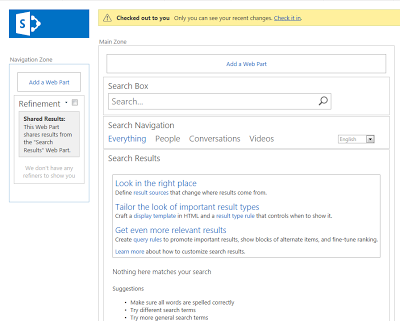
Select Refinement - Edit web part
(Take the mouse up to Refinement heading, and you should get a little triangle to the right, click that and Edit web part should be a choice in the menu)
You will get a column to the right with settings for the webpart:


I have moved it up to the top of my refiners, so it will be shown to the top in the refinement panel.
Select ok twice and Save and then Check in your page.
You can now search and refine on your Content Types in SharePoint 2013.
Your content types just got a whole lot more useful :)

The image shows search results for the word sharepoint, and lists Content Types SharePoint found in the results.
Note that this is the actual content types you have configured on your site, not the document types like Word, PDF etc.

This image shows the same result but refined with the Content Type FAQ.
FAQ is a content type I have defined in our Site Collection, it could be anything really.
We have content types like Offer, Contract, Design document etc.
As you can see the FAQ results include PDFs, Web pages and Word documents.
So how do we set this up so we can make use of the nice content types we have already defined for our sites?
First we need a Search Center.
(Hop on over to http://technet.microsoft.com/en-us/library/hh582314.aspx or maybe http://www.c-sharpcorner.com/UploadFile/Roji.Joy/how-to-configure-search-centre-in-sharepoint-2013/ for some guidance if you haven't one already)
To be able to refine our search using our content types, we need to add a refiner to our search page.
In SharePoint 2010 we would also need to add a managed property,
but now in SharePoint 2013 this is available out of the box.
(See this article for a walkthrough on how to set this up in SharePoint 2010:
http://www.glynblogs.com/2011/01/create-a-content-type-search-refinement-panel-in-sharepoint-2010.html)
Go to your Search Center Url and Edit the page:

(Take the mouse up to Refinement heading, and you should get a little triangle to the right, click that and Edit web part should be a choice in the menu)
You will get a column to the right with settings for the webpart:

Click Choose refiners.
In the available refiners you will now have the option to select SPContentType as a refiner.
Note that it is not ContentType, contentclass etc, but SPContentType. You'll find it near the bottom of the list.

Add it to the Selected refiners.

I have moved it up to the top of my refiners, so it will be shown to the top in the refinement panel.
Select ok twice and Save and then Check in your page.
You can now search and refine on your Content Types in SharePoint 2013.
Your content types just got a whole lot more useful :)
Subscribe to:
Posts
(
Atom
)

 Posts
Posts

